

Kitchen Environments
Create separate kitchen environments for different preparation areas such as Pizza, Drinks, Salad or other stations in your restaurant, plus an optional catch-all station and an Unassigned items board so nothing slips through.
Keep your kitchen team focused on what needs to be prepared, what is already cooking, and what is ready to go. Kappino’s Kitchen Display System gives your restaurant a live digital view of incoming orders, routes menu categories and specific items to the right kitchen environments, and helps teams move orders through preparation with clear status control.
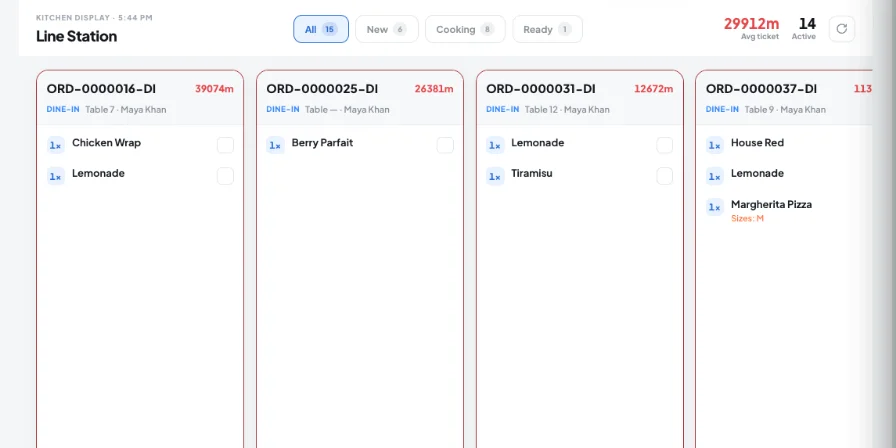
During busy service, the kitchen needs more than a list of orders. Teams need to know which orders are new, which items are being prepared, what is ready, and which station is responsible for each part of the order.
Kappino’s Kitchen Display System brings that information into one live kitchen workspace. Orders can be organized by kitchen environment, while menu categories and individual items can be assigned to the stations where they are prepared.
Instead of making kitchen teams work through a general order queue, Kappino gives each station a focused view of the work assigned to it.
Kappino gives kitchen teams a clear view of active orders and the tools to organize preparation around the way your restaurant actually works.
Create separate kitchen environments for different preparation areas such as Pizza, Drinks, Salad or other stations in your restaurant, plus an optional catch-all station and an Unassigned items board so nothing slips through.
Assign menu categories to a kitchen environment so items from selected categories are sent to the station responsible for preparing them.
Assign individual menu items to a specific kitchen environment when a dish needs a more precise preparation workflow.
View orders by All, New, Cooking and Ready status so kitchen teams can quickly understand what needs attention.
Every ticket shows how long it has been waiting. Timers turn amber at 8 minutes and red at 15 minutes, and the header shows the average ticket time for the service.
Tap a dish to move it from New to Preparing to Completed, or use Start all to begin a whole ticket in one tap. Mark ready and Bump order when it is done.
When an order spans several stations, each one sees only its own lines, with a badge such as “2 of 5 lines” and a “waiting for other stations” note once its part is done.
Extras, removed ingredients, kitchen notes, the guest's seat and the preparation order for each dish appear on the ticket, and dishes added after the order was sent are clearly marked as added.
Create a dedicated kitchen environment for a preparation area such as Pizza Station, Drinks, Salad or another part of your kitchen.
Select the menu categories that should be sent to the selected kitchen environment. This gives your restaurant control over where different types of menu items are prepared.
For more precise control, select individual menu items and send them to a specific environment. This is useful when a particular dish needs to be handled by a specific station.
Once orders enter the kitchen workflow, they appear on the display straight away. Teams can view active tickets, use the All, New and Cooking views, and start a single dish or the whole ticket.
As preparation is completed, kitchen staff can mark items ready and use the Bump action to move completed work forward.
Keep order information visible on the kitchen display instead of relying on scattered instructions or repeated communication between teams.
Route menu categories and specific items to the appropriate kitchen environments so teams can concentrate on the work assigned to their station.
Use New, Cooking and Ready views to understand the current state of kitchen work without searching through the entire order flow.
Mark completed items and use Bump to make readiness visible as orders move through preparation.
Configure environments around your actual menu structure, from broad category routing to individual item assignments.
Organize kitchen preparation around menu categories, stations and service requirements while keeping active orders visible to the team.
Create a dedicated pizza environment and route pizza-related menu items to the station responsible for preparation.
Separate drinks and food preparation into focused kitchen environments so each team can work from the orders relevant to them.
Create dedicated preparation environments for delivery-focused menus and keep kitchen production organized as order volume changes.
Kappino’s Kitchen Display System works as part of the wider restaurant workflow, connecting kitchen preparation with the operational information teams already use.
Keep orders, preparation status, and kitchen stations connected in one live workspace.
Move order details into the kitchen with the information needed for preparation, including order changes sent after the first ticket.
Route menu categories and items to the right kitchen stations.
Track orders from preparation to ready status.
Keep kitchen, front-of-house, and managers aligned.
Choose the package that fits your restaurant operations and business needs.
Essential tools for small restaurants, cafés, and single-location businesses.
€99/ month
What's included:
Most popular plan
Advanced operational tools for growing restaurants.
€199/ month
What's included:
Advanced tools for multi-branch operations, integrations, loyalty, and AI.
€399/ month
What's included:
Prices are for business customers and exclude VAT and other applicable taxes, which are shown on your invoice. Prices per month. Final pricing may vary depending on setup, integrations, support requirements and business needs. Not sure which plan fits? Book a personalised demo
POS, orders, kitchen flow, inventory, reporting and AI tools built for modern restaurant operations.