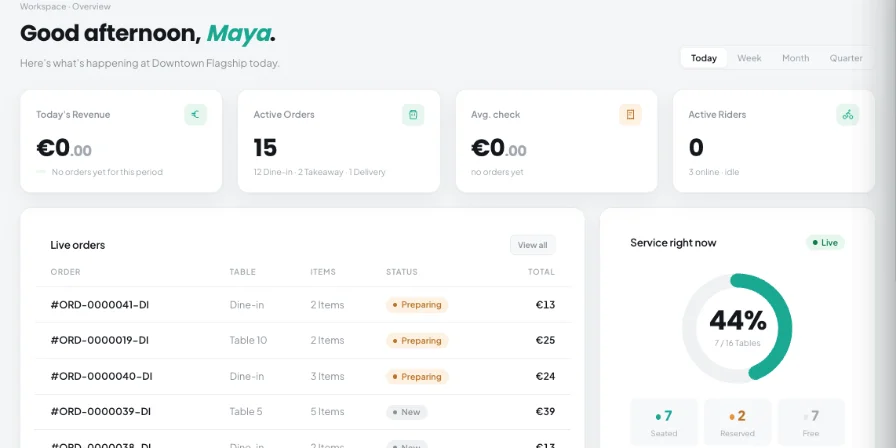
Restaurant costs come from many parts of daily operations. Food and supply purchases, utilities, delivery, repairs, marketing, rent, taxes, labor, and other operating costs can quickly become difficult to review when records are spread across different files or systems.
Kappino gives restaurant teams a structured place to record and review expenses, with details such as category, amount, tax, currency, branch, vendor, invoice number, payment method, status, and notes. This keeps expense records easier to search, filter, correct, and review over time.
Teams often need to:
01 Keep expense records organized in one workspace.
02 Filter expenses by category, status, source, and date.
03 Keep the vendor, invoice, payment, branch, and note details with the expense record.
04 Review expense activity alongside revenue and other cost information.
Everything You Need to Track Restaurant Expenses
Kappino's Restaurant Expense Management workspace brings manual entry, expense review, receipt and invoice scanning, recurring expense templates, CSV import, duplicate review, and cost alerts into one workflow.
Real-Profit Dashboard
Review revenue, expenses, labour cost from your scheduled shifts, and net profit for a selected date range. The dashboard also shows spending by category, a daily or monthly revenue-versus-expenses trend, each cost’s share of revenue, and a branch comparison.
Expense Records
Create and edit expense records with title, date, category, amount, tax, currency, branch, status, vendor, invoice number, payment method, and notes.
Search and Filters
Find expense records by title or notes and narrow the list by category, status, source, and date range.
Multiple Expense Sources
Review expenses originating from manual entry, CSV import, AI scanning, recurring entries, and inventory purchases — stock you receive or import from a supplier invoice is booked as an expense automatically.
AI Receipt and Invoice Scans
Upload a JPG, PNG, PDF, XLSX or CSV file up to 15 MB for AI-assisted extraction. Review the fields, see which existing supplier was matched (or that a new one will be created), and approve or reject the scan. Kappino warns you if a similar expense was recorded in the last seven days.
Recurring Expense Templates
Create recurring expense templates with a category, branch, amount, currency, cadence, interval, next due date, vendor, status, and notes. Cadences run daily, weekly, biweekly, monthly, quarterly or yearly; entries are created automatically and you get an email reminder three days before each one. Kappino also detects repeating patterns in your expenses that you can turn into templates.
CSV Import
Paste or upload CSV expense data, preview the import, review the detected fields, and import records after validation. The workflow also provides an option to allow duplicates.
Duplicate Review
Review suspected duplicate expense entries grouped around matching vendor and amount information before removing unnecessary records.
Alerts and Cost Tips
Spot cost spikes compared with your recent four-week average, and review tips you can mark as applied or dismiss.
How Kappino Restaurant Expense Management Works
01
Record an Expense
Create an expense manually and enter the required financial and operational details.
02
Capture Supporting Information
Add vendor, invoice, payment method, notes, branch, tax, and other available details to keep the record complete.
03
Review and Confirm
Review the expense record or AI-extracted information, including the matched supplier, before it contributes to confirmed expense reporting.
04
Schedule Repeating Costs
Use recurring templates for expenses that follow a regular cadence. Kappino creates each entry on time, emails a reminder three days before, and keeps the next due date and active/paused status up to date.
05
Import Existing Records
Use CSV import when expense data already exists in a structured file, with preview/dry-run support before importing.
06
Monitor and Clean Up
Review duplicate records, cost spikes, and recommendations so the expense dataset remains easier to manage and review.
Turn Expense Data Into Clearer Cost Visibility
Clearer Expense Records
Keep financial details, vendors, invoices, payment information, branch context, and notes together instead of scattering them across separate records.
Faster Expense Review
Use search, filters, date ranges, status, category, and source information to locate the records that need attention.
Better Document Capture
Use AI-assisted receipt and invoice scanning to reduce manual data entry when supporting documents are available.
More Consistent Recurring Cost Tracking
Create recurring templates for regular expenses and manage their cadence, next due date, and active or paused status.
Cleaner Expense Data
Review suspected duplicates and validate imported or scanned information before relying on it in expense reporting.
Branch-Level Visibility
Associate expenses with branches and compare branch-level revenue, expenses, net results, and margins through the expense dashboard.
Connect Expense Records With Your Restaurant Operations
Restaurant expenses do not exist in isolation. Kappino associates expense records with branches, and stock you receive by hand or through an approved AI Inventory invoice is booked as an expense automatically, alongside manually entered, imported, scanned, or recurring records.
The expense dashboard can also place expense information alongside revenue and labor cost for the selected period, helping teams review the financial picture of a branch without turning the Expense Management page into a separate inventory, waste, or analytics product page.
Kappino packages
Simple pricing for every restaurant stage.
Choose the package that fits your restaurant operations and business needs.
Starter
Essential tools for small restaurants, cafés, and single-location businesses.
Prices are for business customers and exclude VAT and other applicable taxes, which are shown on your invoice. Prices per month. Final pricing may vary depending on setup, integrations, support requirements and business needs. Not sure which plan fits? Book a personalised demo
Restaurant Expense Management FAQs
What is restaurant expense management software?
Restaurant expense management software helps restaurants record, organize, review, and monitor operating expenses in a structured system. Kappino provides expense records, filters, document scanning, recurring templates, imports, duplicate review, and cost-monitoring views.
What information can I record for an expense in Kappino?
Expense records can include a title, date, category, amount, tax, currency, branch, status, vendor, invoice number, payment method, and notes.
Can I track expenses by branch?
Yes. Expense records can be associated with a branch, and the dashboard includes branch comparison information for the selected reporting period.
Can Kappino scan receipts and invoices?
Yes. The AI Scans area accepts JPG, PNG, PDF, XLSX and CSV files up to 15 MB for AI-assisted field extraction. Each scan is matched to an existing supplier where possible and can be reviewed before it is approved or rejected.
Can I import restaurant expenses from CSV?
Yes. Kappino provides a CSV Import workflow where users can paste or upload data, preview the import, and then import the records.
Can I manage recurring restaurant expenses?
Yes. Recurring templates can be created with a category, branch, amount, currency, cadence, interval, next due date, vendor, active or paused status, and notes. Kappino creates each entry automatically and emails a reminder three days before it is due.
Does Kappino help identify duplicate expenses?
Yes. The Duplicates area identifies suspected duplicate entries for review, allowing the team to inspect grouped records before removing unnecessary entries.
Can I review expense trends?
Yes. The Expense Dashboard includes a revenue-versus-expenses trend and additional cost and spending views for the selected period.
Can Kappino show unusual cost activity?
Yes. The Alerts & Tips area flags cost spikes compared with your recent four-week average and offers tips you can mark as applied or dismiss.
Can expense records come from inventory activity?
Yes. Stock you receive by hand or import through an approved AI Inventory invoice is booked as an expense automatically, with “inventory” as its source, so purchases appear alongside your other expenses.
Can Kappino show my real profit, including labour?
Yes. The Expense Dashboard combines revenue, expenses and labour cost from your scheduled shifts to show net profit for the selected period, with a comparison across branches.