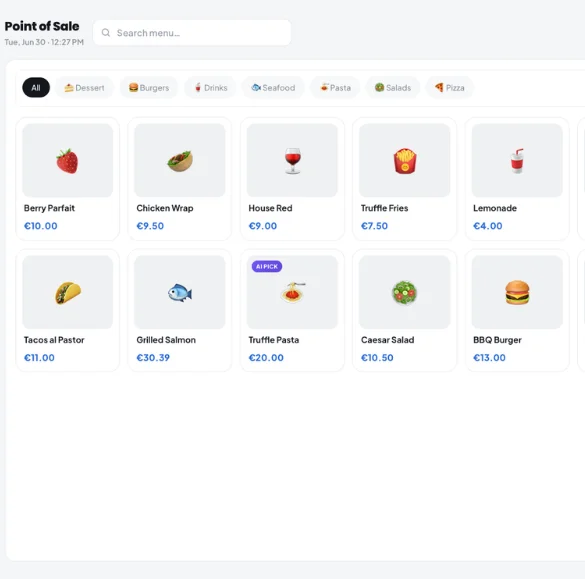
The smart restaurant POS Software built for European hospitality
The smart restaurant POS system built for European hospitality. Kappino connects your front-of-house, kitchen, and back-office into one fast, cloud-based platform.
A restaurant point-of-sale (POS) system is the operational hub of your venue, far more than a billing tool. A modern restaurant ePOS connects order management, kitchen communication, table management, payment recording, staff access, and business reporting into one unified restaurant platform.
Increase efficiency with a connected restaurant POS system
Reduce billing errors with automatic VAT, cover charge and discounts at checkout
Serve more customers with less effort using real-time order management
Why the Right POS System Changes How Your Restaurant Runs
Without the right POS
Orders get lost between front-of-house and kitchen without a proper kitchen order management process, causing delays and guest frustration.
Manual billing errors from outdated restaurant billing software reduce table turnover and damage your revenue per cover.
Disconnected systems mean staff waste time reconciling reports at the end of the shift instead of relying on automated restaurant reporting.
No visibility of peak hours, best-selling items, or channel mix without real-time restaurant POS analytics.
With Kappino POS
Orders fire instantly to the kitchen display with zero miscommunication or paper tickets, true kitchen display system efficiency.
Bills are generated in seconds with VAT, cover charge and discounts applied automatically through smart restaurant billing automation.
Every sale updates your live dashboard and reports the moment it is paid, with no re-keying at the end of the night.
Live dashboards show revenue, active orders, average check and active riders, with built-in restaurant staff management alongside.
Everything Your Restaurant Needs in One Point of Sale System
As a complete POS system for restaurants, Kappino brings nine integrated capabilities covering every part of your service, from the moment a guest walks in to the moment they walk out.
Fast Billing & Checkout
Generate itemised bills in one tap with VAT-inclusive prices, the cover charge and percentage or fixed discounts applied for you, with no manual calculations.
One-tap bill generation
Automatic VAT, cover charge & discounts
Print or email 80 mm receipts
Kitchen Order Tickets (KOT)
Use Send to kitchen to fire the order to the kitchen display or printer without taking payment, with extras, removed ingredients, notes and the guest's seat.
Instant order transfer
Modifiers & special notes
Zero communication errors
Multi-Device & Handheld POS
Kappino runs in the browser on iPad, Android tablets, Windows PCs and Macs, and the Kappino app is on the App Store and Google Play. Take orders at the table on a tablet and pick up held tickets on any terminal. A desktop app with offline mode is in development.
iPad, Android tablets, Windows & Mac
Tableside ordering
Held tickets on any terminal
Live Sales Reporting
Real-time dashboards showing revenue, covers, average spend, and best-selling items, updated with every transaction.
Live revenue dashboards
Best-seller tracking
Sales by channel
Table Management
Visual floor plan with live table status, seat counts and reservation linking. Book several tables together as one reservation, and split the bill by guest or by item.
Live available/occupied status
Multi-table reservations
Reservation linking
Flexible Payment Options
Record cash, card, QR code, mobile wallet or online payments, with tendered amount and change for cash. Kappino works alongside your existing card terminal. Split bills between guests or payment methods with ease.
Cash, card, QR & wallet recorded
Split billing between guests
Partial payment tracking
Held Tickets & Order Edits
Hold a ticket and resume it later on any terminal. Edit an order after it has gone to the kitchen, and only the new lines are sent, while dishes already cooking stay as they are.
Held tickets on every terminal
Edit after Send to kitchen
Only new lines reach the kitchen
Staff Roles & Access
Give every team member the right access with a roles and permissions matrix, limit users to the branches they work in, and sign out lost or shared devices from device and session management.
Role-based access control
Custom roles & branch access
Device & session management
Reservations & Table Booking
Link incoming reservations to specific tables and floors. View all bookings in a single timeline with guest details and notes.
Reservation-to-table linking
Single booking timeline
Guest notes & details
Restaurant POS Analytics That Help You Run a Smarter Business
Every transaction processed through Kappino's restaurant POS system feeds real-time business intelligence on sales trends, channels and best-sellers, so you can make faster, better-informed decisions across your operation.
Best-Selling Item Reports
See which dishes drive the most revenue and which are underperforming, by service, day, or period.
Sales by Channel & Average Check
Compare dine-in, counter, takeaway and delivery revenue, and track your average check per cover as the service goes on.
Peak Hour Analysis
Understand your busiest periods so you can staff optimally, reduce wait times, and serve more covers.
Sales Forecasting
Predict future sales from your own history, with public holidays and seasonality taken into account and an honest confidence badge on every forecast.
Restaurant POS Software Designed for the European Regulatory Environment
Operating across Europe means navigating some of the world’s most stringent data protection requirements. Our platform makes compliance straightforward, not an afterthought.
Compliance built into your restaurant operations
Kappino helps restaurants handle data, tax rules, and multi-location reporting with a system designed for European hospitality.
Data Handling That Supports GDPR
Guest and transaction data are stored on Swiss-hosted infrastructure, with roles, an audit trail and data export and deletion tools that help you meet your GDPR obligations.
VAT by Order Type, Per Dish
Menu prices are VAT-inclusive. Each dish carries its rate for dine-in and counter and its rate for takeaway and delivery, one bill can carry several rates, and every receipt shows a per-rate VAT breakdown.
Multi-Location Reporting
Switch between branches or view them all together, with per-branch KPIs for franchises and hospitality groups.
Fiscal Requirements by Country
Kappino supports country-specific fiscal requirements, such as TSE-signed receipts under the KassenSichV in Germany and electronic receipts through a registratore telematico (RT) in Italy. Our team confirms the right fiscal setup for your country during onboarding.
From Order to Reconciled Sale: The Restaurant POS Workflow
No paper tickets. No manual reconciliation. Kappino's restaurant POS software connects every order and payment, from the moment a guest orders to the moment it lands in your reports, in one continuous, automated workflow.
01
Order Captured Instantly
Staff take the order on a tablet, PC or Mac for dine-in, counter, takeaway or delivery. Kappino's order management system logs every item, extra, removed ingredient, note and seat the moment it's entered.
02
Kitchen Order Tickets Sent Automatically
Send to kitchen fires the order to the kitchen display or printer as a digital Kitchen Order Ticket (KOT), complete with extras, removals, notes and the preparation order for each line.
03
Itemised Billing With Automatic VAT
Kappino generates an itemised bill in one tap, applying the correct VAT rate by dish and order type, the cover charge and any discount, with VAT-inclusive prices and a VAT breakdown on the receipt.
04
Flexible Payment Recording
Guests pay by cash, card, QR code or digital wallet on your existing terminal, and Kappino records the method, tender and change. Split the bill equally, by item or by hand on dine-in, counter and takeaway orders.
05
Real-Time Sales Reporting
The moment payment is taken, it updates every screen and your live sales dashboard: revenue, average check and best-sellers. Loyalty points are added to the guest's account at checkout.
Built for Busy Service
The details that keep a busy service moving are already in the POS, so your team spends less time fixing orders and more time with guests.
Four Order Types
Switch between dine-in, counter, takeaway and delivery from the top of the screen. Counter orders need no table and no guest details, and they get their own line in your revenue reports.
Seats, Extras & Preparation Order
Assign the guest's chair, add extras, remove or swap ingredients, add notes per dish, and number lines so the kitchen knows what to make first.
Takeaway & Delivery Details
Customer autocomplete fills in returning guests. Takeaway orders carry a pickup time, and delivery addresses are found with address search and a map pin.
Cover Charge
Set a cover charge (coperto) per dine-in guest. It is left off takeaway and delivery orders automatically.
Receipts & Pre-Bills
Print 80 mm receipts with a VAT summary, print a pre-bill for the table or each split account, or email the receipt straight from the payment screen.
Split Bills on More Channels
Split equally, by item or by hand, and collect each share separately on dine-in, counter and takeaway orders.
Kappino vs. traditional POS systems
A side-by-side look at how a connected, cloud-based restaurant POS compares to legacy on-premise systems still common across European hospitality.
Capability
Traditional POS
Kappino Cloud POS
Setup & hardware
Fixed terminal, on-site install
Runs in the browser on tablets, PCs & Macs
Changes after sending
Reprint or verbal hand-off
Edit the order, only new lines go to the kitchen
Kitchen order tickets
Paper tickets or add-on module
Instant digital KOT with modifiers
Multi-branch reporting
Manual reconciliation per site
Centralised, real-time reporting
VAT & tax rules
Single-rate, manual updates
VAT by order type, per dish, auto-applied
Data protection (GDPR)
Depends on the vendor and hosting
Swiss-hosted core platform, with export and deletion tools
Staff access
Separate system required
Built-in roles, permissions & device sessions
Software updates
Manual, on-premise patching
Automatic, nothing to install
A Cloud POS System Built for Every Type of Operator
Who uses Kappino?
From independent restaurants to large multi-location operators across Europe, Kappino POS is built to scale with you.
Easy to learn for non-technical staff
Reduces billing errors and manual reconciliation
Scalable for single venues and multi-branch chains alike
Runs in the browser on your existing tablets, PCs and Macs
Live dashboards across front-of-house, kitchen, and reports
Kappino packages
Simple pricing for every restaurant stage.
Choose the package that fits your restaurant operations and business needs.
Starter
Essential tools for small restaurants, cafés, and single-location businesses.
Prices are for business customers and exclude VAT and other applicable taxes, which are shown on your invoice. Prices per month. Final pricing may vary depending on setup, integrations, support requirements and business needs. Not sure which plan fits? Book a personalised demo
Common questions from European restaurant operators
Can Kappino POS work offline if my internet goes down?
Kappino runs in the browser on iPad, Android tablets, Windows PCs and Macs, and the web POS needs an internet connection. A desktop app with offline mode is in development.
Can staff members have different levels of access on the POS?
Yes. Kappino's roles and permissions matrix lets you define exactly what each role can see and do, module by module. A server might take orders and close their own tables; a manager can apply discounts, void dishes with a reason and view sales reports; only the owner has full access to financial summaries and system settings.
Can I run Kappino POS on my existing tablets and devices?
Yes. Kappino runs in the browser on iPad, Android tablets, Windows PCs and Macs, so you can use existing hardware without costly replacements, and the Kappino app is on the App Store and Google Play. For kitchens, the KDS can run on any screen with a browser.
Does Kappino POS support multi-branch restaurant operations?
Yes. Each branch can have its own menu, prices, floor plan and staff setup, while the owner can switch between branches or view them all together for a consolidated view of revenue and operations.
How long does it take to set up and train staff on Kappino POS?
The guided Quick Setup walks you through 9 steps, from language and country to menu, tables, riders and staff, with CSV templates for bulk import and email invitations for your team. You can skip steps and come back later, and the interface is designed to be intuitive for non-technical staff.
Does Kappino support fiscal requirements such as TSE or the Italian registratore telematico?
Yes. Kappino supports country-specific fiscal requirements, including TSE-signed receipts in Germany (KassenSichV) and electronic receipts through a registratore telematico (RT) in Italy. We confirm the right fiscal setup for your country during onboarding.