

Rider Directory
Keep rider profiles, contact details, vehicle information and delivery activity organized in a centralized directory.
Manage your restaurant delivery team from one connected workspace. Kappino helps you organize rider profiles, availability, vehicle details and access to the Kappino Rider app, while a live map, rider chat and proof-of-delivery photos give your team clear visibility over active deliveries.
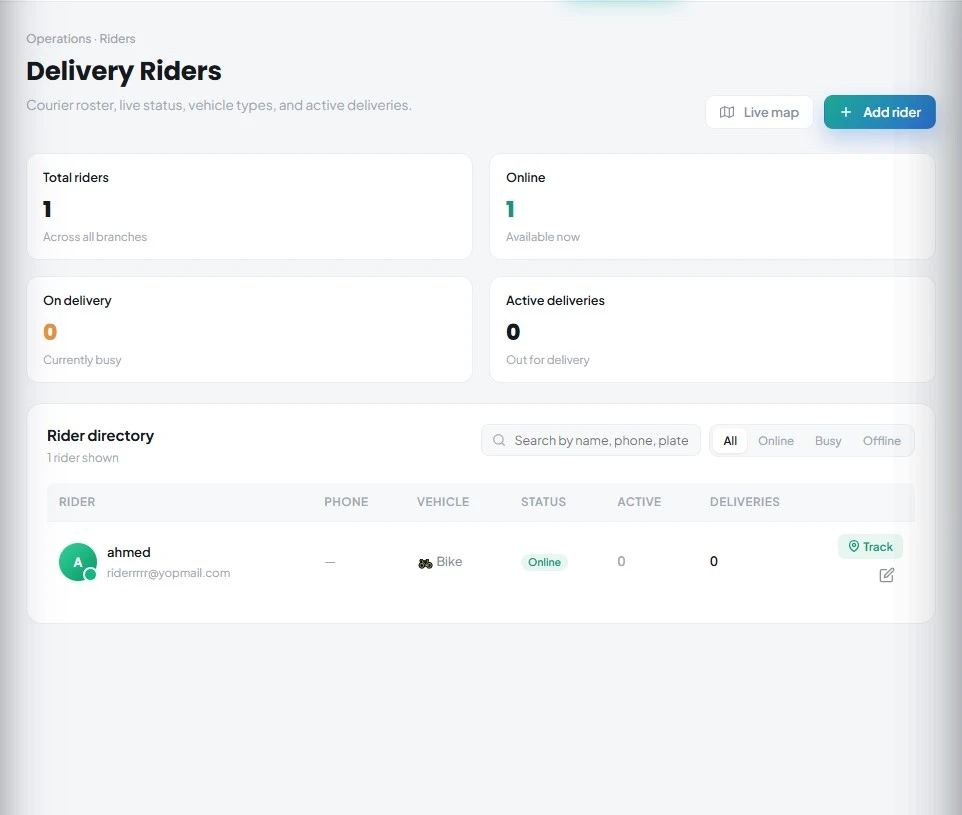
Managing in-house delivery riders becomes harder when rider information, availability and delivery activity are spread across messages, spreadsheets or separate tools. Kappino brings your delivery team into the same restaurant management platform used for orders and daily operations.
Create and maintain rider profiles, check availability, dispatch deliveries and give riders access to the Kappino Rider app, available on the App Store and Google Play, from a centralized workspace.
Keep rider information, availability and delivery activity organized in one place, so managers can coordinate their delivery team without switching between systems.
Keep rider profiles, contact details, vehicle information and delivery activity organized in a centralized directory.
See which riders are online, busy or offline and use status information to understand current delivery availability.
Maintain key rider details such as name, phone, email, vehicle type, license plate and operational notes.
See total riders, who is online or busy, and how many deliveries are active right now, for a clear view of team activity.
Create a login for each rider and send it by email, or resend it when needed. Riders use the Kappino Rider app on iOS or Android to receive deliveries, share their location, mark orders collected and delivered, and attach a proof-of-delivery photo.
See every active rider on the live map, or open a single rider to follow their delivery from the restaurant to the customer.
Assign a delivery order to a rider in a couple of taps, with a suggested rider shown in the assign window.
Message riders from the chat inbox in Kappino, and riders reply from the app, so address questions and delays are sorted without phone calls.
Riders attach a photo on handover, and managers can also add, replace or remove a proof photo from the order.
Manage your delivery team through a simple workflow that keeps rider information and availability connected to daily restaurant operations.
Create a rider profile with the information your restaurant needs, including contact details, vehicle type, license plate and notes.
Update rider information whenever contact, vehicle or operational details change.
Use rider status to identify who is online and available, who is busy on a delivery, and who is offline.
Create the rider's login and send it by email. The rider signs in to the Kappino Rider app and is ready to receive deliveries.
Assign deliveries, follow riders on the live map, chat with them, and check the proof-of-delivery photo once each order is handed over.
Keep rider details, vehicles and operational notes in one workspace.
Quickly understand which riders are available, busy or offline.
Add, edit and maintain rider profiles without separate records.
Keep Kappino Rider app access connected to the rider profile and restaurant workflow.
See delivery activity on the live map and open a single rider's tracking when needed.
Give managers a structured workspace for everyday rider administration.
Manage rider availability and delivery activity alongside everyday restaurant operations.
Keep a delivery team organized during busy service periods.
Coordinate riders as prepared orders move from kitchen operations into delivery.
Maintain structured rider information and operational visibility across locations.
Delivery rider management works as part of the wider Kappino restaurant workflow, keeping rider administration connected to the operational systems your team already uses.
Connect orders, kitchen preparation, rider management and tracking in one restaurant delivery workflow.
Manage delivery orders within your connected restaurant workflow.
Move prepared orders from the kitchen to rider handoff.
Manage rider profiles, availability, dispatch and Kappino Rider app access.
Track orders and riders throughout the delivery process.
Choose the package that fits your restaurant operations and business needs.
Essential tools for small restaurants, cafés, and single-location businesses.
€99/ month
What's included:
Most popular plan
Advanced operational tools for growing restaurants.
€199/ month
What's included:
Advanced tools for multi-branch operations, integrations, loyalty, and AI.
€399/ month
What's included:
Prices are for business customers and exclude VAT and other applicable taxes, which are shown on your invoice. Prices per month. Final pricing may vary depending on setup, integrations, support requirements and business needs. Not sure which plan fits? Book a personalised demo
POS, orders, kitchen flow, inventory, reporting and AI tools built for modern restaurant operations.