Features

The Restaurant Staff Management Software That Brings Order to Your Team

Roles, shifts, pay structure, and the location of every employee — all in one HR platform for restaurants. With Kappino you always know who’s working, when, and what it costs you. Stop chasing spreadsheets and group chats.

Restaurant staff management software is a digital tool that centralizes roles, shifts, pay, labor costs, and locations in one platform. It replaces spreadsheets, chat threads, and paper notes with a structured system that keeps every piece of staff data current in real time, giving owners and managers a constant, clear view of how the team is organized and what it costs every month.

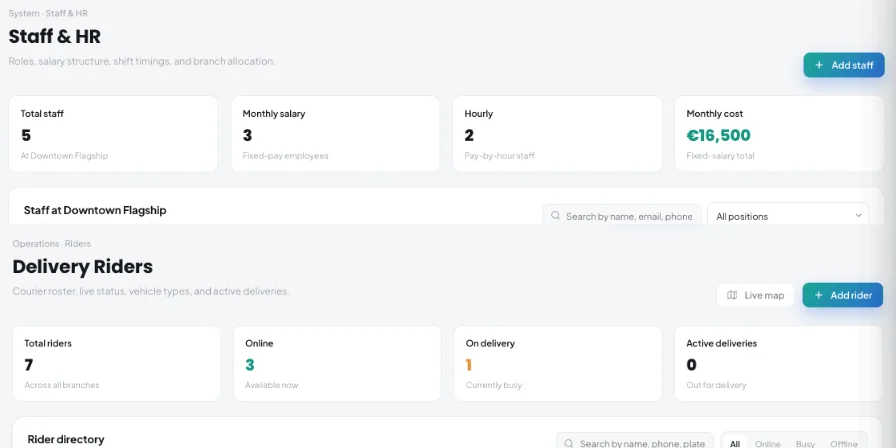
Staff & HR
Staff & HR

Running Restaurant Staff Without the Right Tools Is a Weekly Mess

The restaurant industry has some of the highest turnover and most fragmented schedules of any sector. Split shifts, part-timers, seasonal hires, rotating crews, and multiple locations to coordinate: without proper restaurant staff management software , every week turns into a scramble.

  • 📋 Spreadsheets that spiral out of control They work fine for two or three employees. With a full crew across front and back of house, spreadsheets become a source of errors, double-bookings, and outdated info nobody keeps current.
  • 💬 Shifts shared by chat, often missed A group chat isn’t a scheduling system. Messages get buried, confirmations arrive late, and managers can never be sure a shift swap actually went through.
  • 💸 Monthly labor cost that’s always a guess Without a central system, pay, overtime, and hourly cost per role stay rough estimates. It’s nearly impossible to know how much staffing really weighs on operating costs.
  • 🏪 More locations, more confusion Anyone running a chain — or even just two venues — knows how hard it is to track who’s assigned where. Roles overlap and information is never aligned.
  • 🔄 High turnover, slow onboarding Hospitality has some of the highest turnover rates of any industry. Every new hire needs to be set up fast with a role, shifts, and a location. Without a structured system, every change brings instability.
  • 🔐 Sensitive data left unprotected Pay and salary structures are confidential. Files shared by email or in unstructured cloud folders make it impossible to control who can see what.

Everything You Need to Organize Your Venue’s Team

Kappino centralizes front-of-house and kitchen shift planning, role management, pay structure, and cost tracking in one platform connected to the rest of your operations.

Complete Employee Profiles

Every team member has a profile with name, position, role on the team, assigned shifts, and location. All details can be updated in real time by anyone with the right permissions.

  • Name, position, and role details
  • Assigned shifts and working location
  • Real-time profile updates

Roles and Job Positions

Define and assign specific roles — server, chef, cook, bartender, floor manager, host — with the flexibility to manage front-of-house and kitchen staff separately.

  • Assign clear job positions
  • Separate front-of-house and kitchen roles
  • Keep team structure organized

Shifts and Working Hours

Set hours and working days for each employee. Manage split shifts, lunch, dinner, and weekend coverage with a clear structure you can read at a glance.

  • Set working days and hours
  • Manage split shifts and coverage
  • View schedules clearly at a glance

Pay Structure by Role

Choose hourly, weekly or monthly pay for each profile and enter the rate. The Staff dashboard totals your fixed monthly salary cost automatically, updating with every change. Only admins can edit pay.

  • Hourly, weekly or monthly pay
  • Automatic fixed-cost total
  • Pay edits limited to admins

Location Assignment

Running more than one venue? Assign each employee to their home location. Get a unified view of headcount across every site without switching tools.

  • Assign staff to a home location
  • Track headcount across every site
  • Manage multi-location teams easily

Permissions and Access Control

Only authorized users can add employees, change shifts, or update pay structures. A roles and permissions matrix covers 30 modules, so sensitive staff data stays protected.

  • Control who can update staff data
  • Protect pay and salary information
  • Keep employee records secure

Shifts, Costs, and Permissions: How It Actually Works

Scheduling a restaurant isn’t like scheduling an office. Split shifts, rotating roles, lunch-and-dinner coverage, part-time staff: Kappino organizes all of it without making the job harder for whoever runs it.

01

Structured Shift Planning for Every Type of Service

A restaurant open for both lunch and dinner has completely different needs than a dinner-only venue. With Kappino you can set different hours for each employee — morning, lunch, dinner, split shift — and tie them to specific working days of the week.

02

Access Control: Who Sees What, Who Can Change It

Not everyone needs access to every piece of staff data. A floor manager doesn’t necessarily need to see the full pay structure. A cook shouldn’t be able to change someone else’s shift. Kappino handles permissions with a matrix of roles and modules, each set to none, view, edit or full access. Full-access users can add employees, edit their data, change shifts, and assign locations. Staff receive their published shifts by email, without access to pay data.

03

Labor Cost Always Up to Date, No Manual Math

One of the most common questions restaurant owners ask: “What is staff really costing me this month?” With Kappino you get a quick answer. The Staff dashboard shows total staff, how many are salaried or hourly, and total fixed monthly cost. Workforce AI adds scheduled labour cost and labour % of sales. These figures update automatically every time a profile or shift changes — no manual calculations.

Track Your Team’s Monthly Cost Without Doing the Math Yourself

Labor is the heaviest line item on any restaurant’s P&L. Workforce AI’s Labor & Cost view turns your schedule into the numbers you need to manage it — this week and in the weeks ahead.

Labour % of Sales

Scheduled hours and cost for the week, labour as a percentage of sales against your target, and overtime shifts flagged.

Labour Cost Forecast

See what the next four weeks will cost, calculated from your published and draft shifts.

Hiring-Need Forecast

Compare demand hours with your team’s capacity by area and see where you may need to hire.

Turnover Risk

A rule-based list highlights team members who may be at risk of leaving, so you can act early.

Staffing Heatmap

See at a glance which days and hours are under- or over-staffed against demand.

CSV & PDF Exports

Download the schedule as PDF or CSV, and your team list and labour data as CSV.

Manage Every Role Across Your Front-of-House and Kitchen Team

A restaurant isn’t made of generic employees. Every venue has its own role structure, with different responsibilities across the floor, kitchen, bar, and management. Kappino lets you define specific roles for every profile and keep them split by department.

Keep service, kitchen, support, admin, inventory, and multi-site responsibilities clear without using separate spreadsheets or disconnected notes.

Chef / Cook

Kitchen shifts, lunch and dinner hours, hourly cost specific to the kitchen team.

Server / Floor Staff

Rotation between services, split shifts, assignment to the dining room or patio.

Floor Manager

Extended permissions to manage their team and organize service.

Bartender / Barista

Bar-specific shifts, kept separate from the kitchen crew, with their own hours.

Support Staff

Dishwashers, kitchen porters, stockroom staff: same level of clarity as every other role.

Manager / Admin

Full access to add, edit, and manage the entire team.

Multi-Site Coordinator

Unified view of staff across every location, with assignment by venue.

Inventory Manager

Connected to the inventory management module for hybrid roles.

HR Software for Restaurants, Bars, Pizzerias, and Beyond

There’s no single type of venue. Kappino adapts to the operational needs of every format — from the small family-run restaurant to the multi-site chain — on the same simple, straightforward platform.

One personnel system for every venue format.

Traditional Restaurants and Bistros

Manage front-of-house and kitchen crews, lunch and dinner shifts, weekend coverage. Track monthly labor cost without a single spreadsheet.

Bars, Cafés, and Coffee Shops

Organize morning, afternoon, and evening shifts for baristas, servers, and cashiers. Kappino’s bar management software includes this module.

Pizzerias and Fast-Casual

Rotate pizza makers, counter staff, and delivery drivers — each role with its own hours and cost. Set it up once, update it in seconds.

Chains, Franchises, and Multi-Site Groups

Assign every employee to their venue, keep management separate per location, and get an aggregated view of costs across the whole network.

Catering and Events

Staff that move between venues for every event, non-standard shifts, flexible roles: Kappino also handles the most variable team structures in hospitality.

Hotel Food & Beverage

Manage floor, kitchen, bar, and breakfast staff separately, with assignment by department and cost control specific to each F&B area.

How to Set Up Your Restaurant’s Staff Management on Kappino

No technical training needed. Load your team, assign shifts, and get a clear view of monthly staff costs — you can even add your staff in bulk from a CSV file in the Quick Setup wizard and invite them by email.

Create a Profile for Each Employee

Enter name, role, and position at the venue. It only takes a few seconds to add each team member. You can edit the details at any time.

Assign Shifts and Working Days

Set working hours and operating days for each profile. Handle split shifts, part-time schedules, and rotations between services just as easily.

Set Up the Pay Structure

Add monthly salary and hourly rate for each employee. Total monthly cost updates automatically — no manual math.

Link Each Employee to Their Location

Running more than one venue? Assign each person to their home location. The org chart stays clear even with teams spread across multiple sites.

Monitor and Update in Real Time

Every change is visible instantly. Add new employees, update shifts, and keep an eye on total staff cost right from the dashboard.

Kappino packages

Simple pricing for every restaurant stage.

Choose the package that fits your restaurant operations and business needs.

Starter

Essential tools for small restaurants, cafés, and single-location businesses.

€99/ month

What's included:

  • POS Terminal
  • Main Branch only
  • Order Management
  • Kitchen Management
  • Inventory & Supplier Management
  • Tables & Reservation
  • Menu Management
  • 3 Staff Accounts
  • Help Centre Support
Select plan

Professional

Advanced tools for multi-branch operations, integrations, loyalty, and AI.

€399/ month

What's included:

  • All Growth plan features
  • Loyalty & Customer Management
  • AI Sales Forecasting
  • WordPress & Shopify Website Integration
  • AI Item Smart Pricing
  • Social Media Management
  • Email Marketing
  • Extra branches: 1–5 at €139 each/month
  • 6+ branches at €99 each/month
  • Priority Help Centre Support + Instant Email Support
Select plan

Prices are for business customers and exclude VAT and other applicable taxes, which are shown on your invoice. Prices per month. Final pricing may vary depending on setup, integrations, support requirements and business needs. Not sure which plan fits? Book a personalised demo

Everything You Want to Know About Restaurant HR Management

Clear answers about staff management software, restaurant shifts, monthly labor costs, multi-location teams, permissions, and Workforce AI.

These answers explain how Kappino helps restaurants centralize roles, shifts, pay, labor costs, staff access, and venue locations in one platform.

Restaurant staff management software is a digital tool that centralizes roles, shifts, pay, labor costs, and locations in one platform. It replaces spreadsheets, chat threads, and paper notes with a system that keeps every piece of staff data current in real time.

With Kappino, anyone with the right permissions can assign shifts and working days to each employee directly from the platform. Every profile shows hours, assigned location, and role, giving an instant overview of team coverage for any time slot of the week.

Yes. Kappino automatically shows your total staff, how many are salaried or hourly, and your total fixed monthly cost. Workforce AI adds scheduled labour cost, labour % of sales and a four-week labour cost forecast. These figures update automatically with every change.

Yes. Each employee can be assigned to a specific location. Owners and managers running multiple venues get a unified view of staff and costs across every site, without juggling separate systems or files.

Only users with the right permissions can add employees, change shifts, update pay structures, or reassign locations. The access control system protects sensitive information from unauthorized changes.

Yes. The Staff & HR module is built for the whole hospitality industry: restaurants, bars, pizzerias, cafés, and catering businesses. Shift, role, and cost features adapt to any type of venue, regardless of team size.

The Staff & HR module lets you manage staff profiles, roles, pay and locations. The Workforce AI module adds intelligence: it plans shifts from forecast demand and availability, lets you compare your rota with the AI plan, staffs events automatically with Auto-staff, and forecasts hiring needs and labour cost.


Kappino Restaurant OS

Run your restaurant from one connected workspace.

POS, orders, kitchen flow, inventory, reporting and AI tools built for modern restaurant operations.